In the latest release of Tugboat (v.2.26.26), we upgraded Puppeteer and Chromium, which power Tugboat’s Visual Diffs and Google Lighthouse Reports. In the process, we made performance improvements to these features, available to customers on Tugboat Plus and higher plans.
Here’s how your Tugboat projects may be impacted and what action to take in case you encounter problems.
Visual diffs
Visual diffs that previously passed may start to fail. Visual diffs are now captured with Chrome 148 (upgraded from Chrome 115). Due to rendering changes, visual diffs comparing a screenshot of a base preview rendered in Chrome 115 with a preview rendered in Chrome 148 will likely fail.
Solution:Regenerate base preview “Before” screenshots for visual diffs in projects where the Visual Diffs feature is active by refreshing the base preview and previews built from it.
How to regenerate both “Before” and “After” screenshots for visual diffs
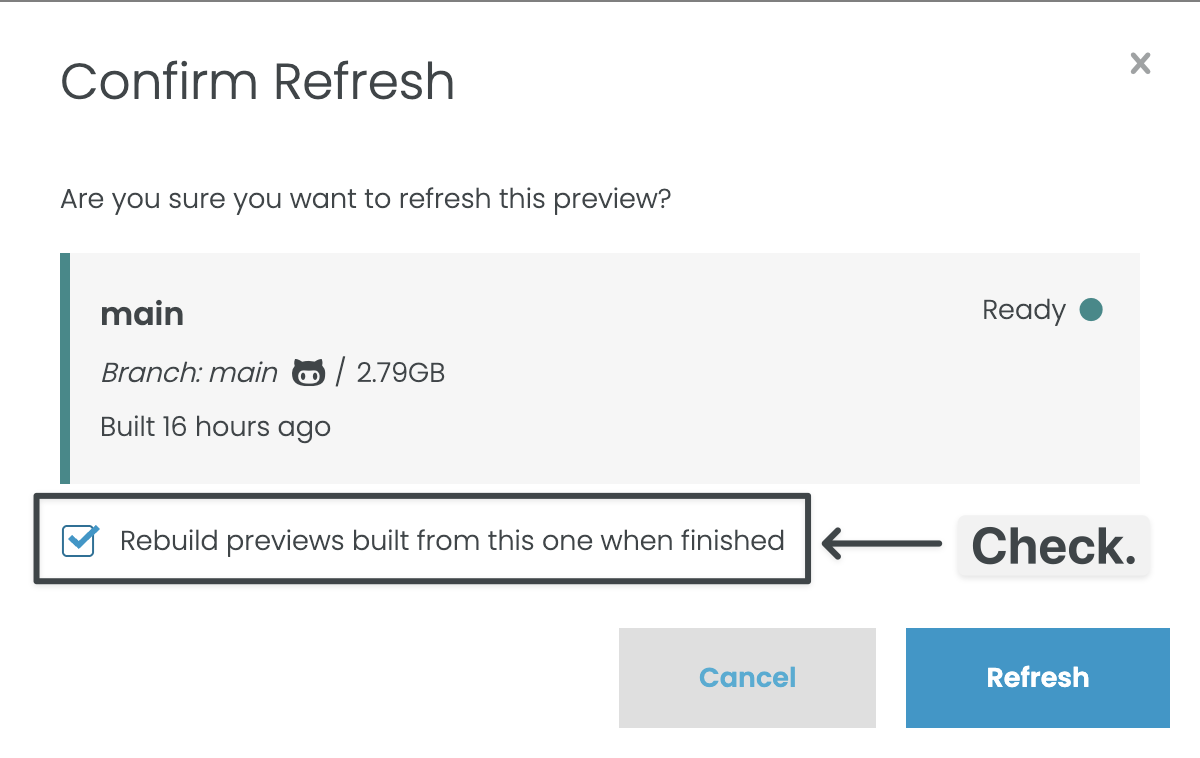
On the base preview, select Actions > Refresh.
A modal will appear. Check the box to refresh previews built from this one.
These actions will regenerate visual diffs and ensure that both the “Before” and “After” screenshots are rendered with the same version of Chromium.
When confirming a refresh, check the box to rebuild previews built from this one.
Google Lighthouse Reports
The Progressive Web App (PWA) report in Lighthouse has been removed. If you are using an API call that explicitly specifies reports in the PWA category, it will fail.
Solution:Update API calls to remove any specific requests for reports in the PWA category.
Support
We’re here for you if you need additional support.
Join us on the Tugboat Slack and post in the #support channel.